Structuring
To structure a library, we must first define whether it will be primarily visual (Flutter) or a command-line tool (Dart). In both cases, the base structure is similar, but the content changes significantly. Let's see an example of what it might look like:
my_library/
|  lib/
|  |  src/
|  |  |  ...
|  my_library.dart
This is so that our end user only has to do the following:
import 'package:my_library/my_library.dart';Keep in mind that files placed directly inside lib/ (and not inside src/) will be public to end users. In that case, you could do the following:
my_library/
|  lib/
|  |  src/
|  |  |  ...
|  my_library.dart // public file
|  my_custom_file.dart // ... also a public file
import 'package:my_library/my_library.dart';
import 'package:my_library/my_custom_file.dart';But then, what should go inside my_library.dart? Normally, this file is used as a barrel file, where the features we want to expose from the library are exported. However, if the library is very simple, you could also place the entry point or even part of the implementation there.
In the case of using a barrel file, we could have the following:
my_library/
|  lib/
|  |  src/
|  |  |  models/
|  |  |  |  model_1.dart
|  |  |  |  model_2.dart
|  |  |  |  models.dart
|  my_library.dart
// models.dart
export 'model_1.dart';
export 'model_2.dart';
// my_library.dart
export 'src/models/models.dart';In this way, we would be complying with what was mentioned above.
As for the content of the library, the structure can vary in many ways depending on the functionality we want to develop. Some examples of libraries could be:
Design systems
Let's analyze a very popular component library that has been gaining traction, named shadcn_ui.
The first thing we can notice in its folder structure is that it has a barrel file where all the content of the library is exported.
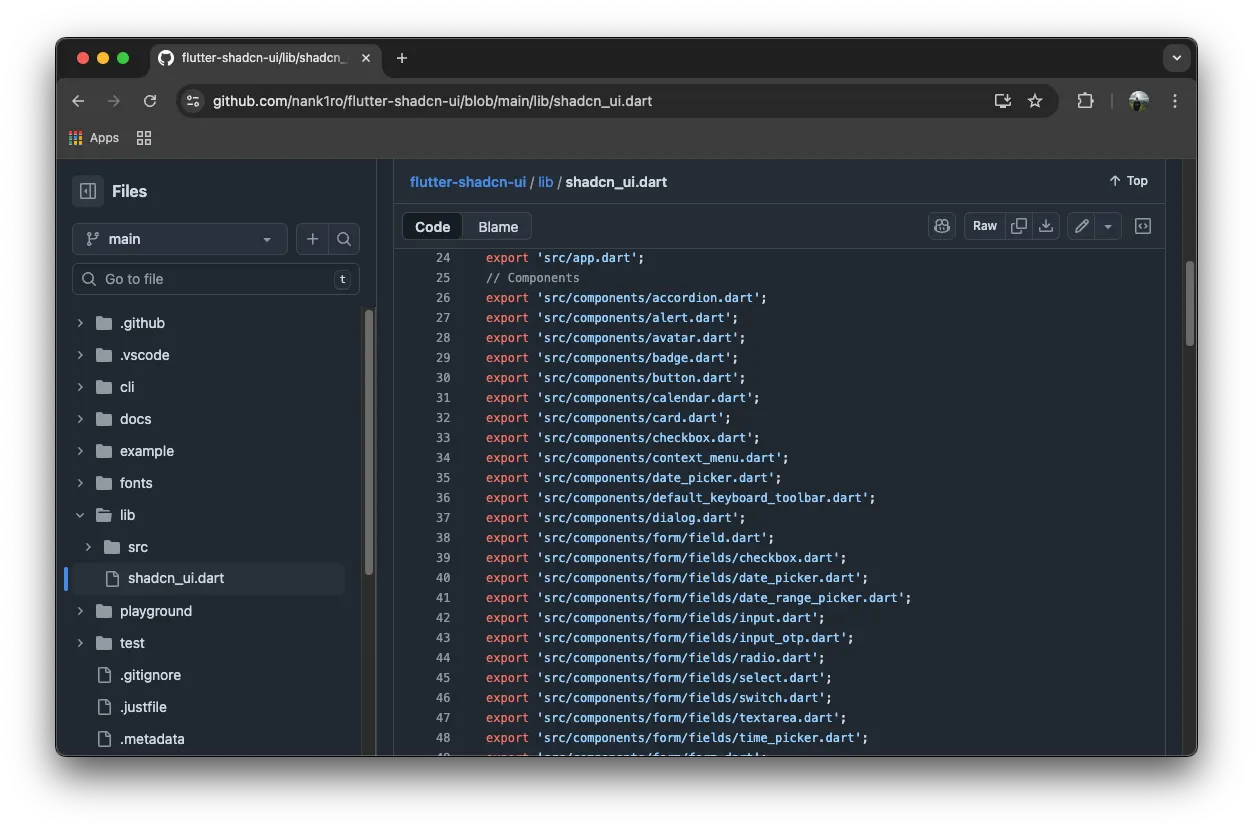
The next thing we see is the project structure; being a component library, it has a components/ folder where all the main content is located.
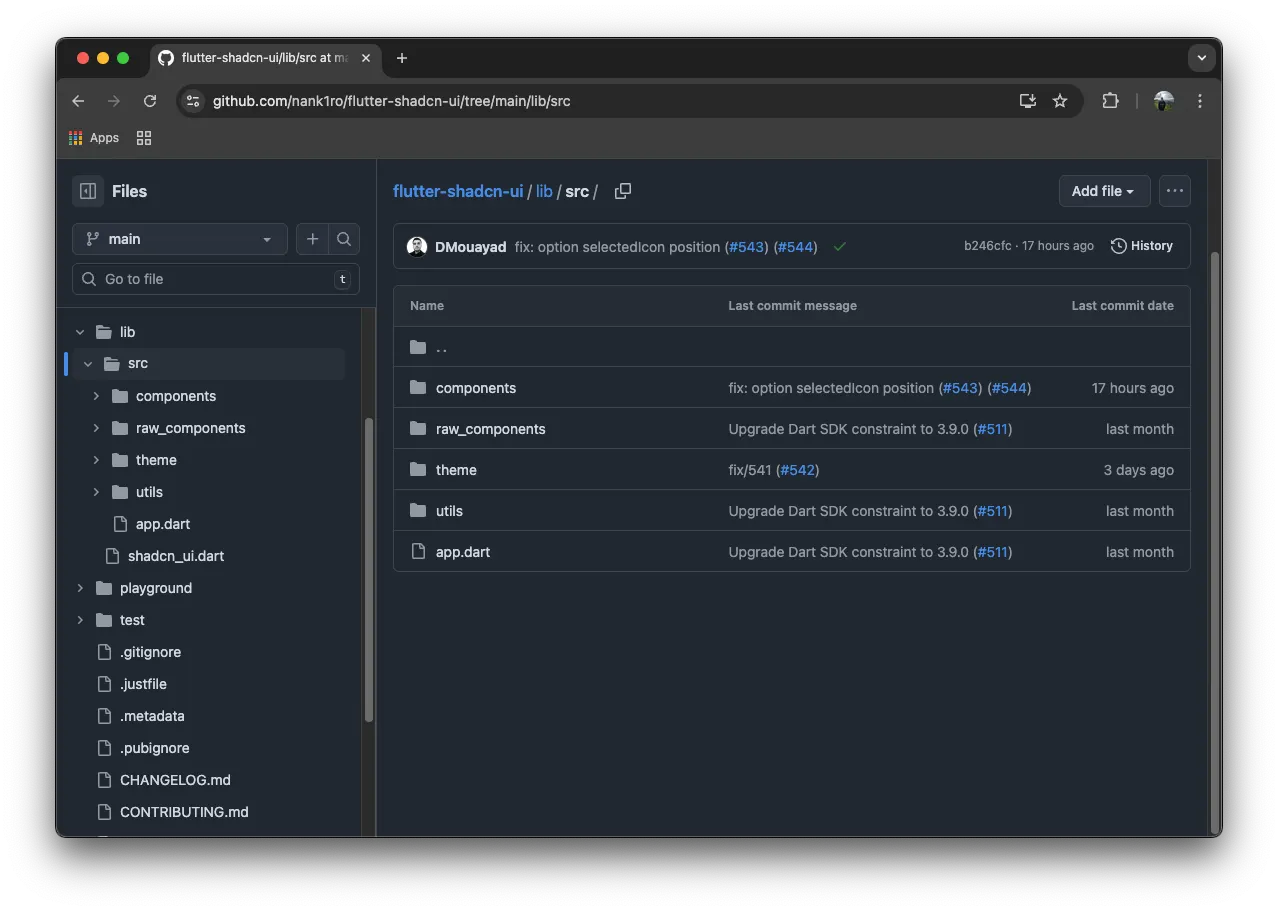
This can be a good example if the goal is to build a library based on visual components. There are also other strategies, such as Atomic Design, about which we already have an article.
If you want to review the structure of shadcn_ui in more depth, you can do so here.
How to create a design system using Atomic Design in Flutter
Command Line Interfaces (CLI)
For command-line packages, the structure is different, as we must have an executable that calls the content of our library.
my_package/
|  bin/ <- Folder where the executable goes
|  |  my_package.dart
|  lib/
|  |  my_package.dart
To create this type of package, you can run the command dart create --template=cli <package_name> and with this we will have an initial template to start working.
Good code practices
When we build a library, it is helpful to think of it as if it were a remote service or an API: it must be predictable, stable, and easy to consume. Your users typically interact with classes and functions that expose parameters to customize the experience.
The Dart team maintains a guide with best practices for designing libraries. You can review it here. Let's look at some examples of what they mention there.
Exposed API
The way classes, parameters, functions, etc., are written has an impact on how users use the library in their daily routine. If we use names that communicate their function, we can greatly facilitate implementation, for example:
// Public API
class TextWidget extends StatelessWidget{
TextWidget({
required this.text,
this.isVisible = true,
});
final String text;
final bool isVisible;
// Build method
...
}
// How a user uses it
class SomeWidget extends StatelessWidget{
Widget build(BuildContext context){
return Scaffold(
body: Column(
children: [ TextWidget(
text: 'Hello everyone!',
),
]
),
);
}
}Keeping this in mind, we must name parameters in a way that their interpretation is natural to the user without needing to read the class documentation. Now let's see the opposite example:
// Public API
class TextWidget extends StatelessWidget{
TextWidget({
required this.text,
this.textVisible,
});
final String text;
final bool textVisible;
// Build method
...
}
// How a user uses it
class SomeWidget extends StatelessWidget{
Widget build(BuildContext context){
return Scaffold(
body: Column(
children: [ TextWidget(
text: 'Hello everyone!',
textVisible: true,
),
]
),
);
}
}In this way, the function of the textVisible parameter is not very intuitive for the user since it does not express an intention or an action, which forces the user to investigate what each parameter does.
Dependency inversion
In application development, we typically use frameworks like GetIt or Riverpod to manage dependencies. However, a library should not impose its dependency container on the user. Doing so creates tight coupling and potential version conflicts.
The correct approach is to use Dependency Inversion. The library should define contracts (abstract classes) and receive implementations through the constructor.
// The contract is defined in the library
abstract class AuthProvider {
  Future<String?> getToken();
}
// Main class of the library
class MySDK {
  final AuthProvider authProvider;
  // The user can pass their own implementation
  MySDK({required this.authProvider});
}
Thanks to this, the libraries will not be coupled to concrete implementations, which expands their usefulness and cross-cutting usability. Otherwise, each user would have to find a way to integrate their implementation into the library's source code.
Documentation
Writing good documentation in classes and parameters also helps make the implementation friendlier. Dart offers a tool to generate HTML documentation that we can then publish; the tool is dart_doc. An example of how to document can be:
/// Parses strings with a specific format and returns a key-value map.
///
/// [input] must be in the format `key=value;key=value`.
/// Returns a `Map<String, String>` with the parsed pairs.
///
/// Throws [FormatException] if the string is invalid.
///
/// ### Example
/// ```dart
/// final parser = Parser();
/// final data = parser.parse('user=juan;role=admin');
/// // data == {'user': 'juan', 'role': 'admin'}
/// ```
///
/// Since: v2.4.0
class Parser {
/// If `true`, enables the new parsing algorithm.
///
/// Default value: `false`. It will be `true` by default from v2.6
/// and the previous algorithm will be removed in v3.0.
final bool enableNewParser;
const Parser({this.enableNewParser = false});
Map<String, String> parse(String input) {
if (input.trim().isEmpty) {
throw const FormatException('The string cannot be empty');
}
return enableNewParser ? _parseNew(input) : _parseLegacy(input);
}
Map<String, String> _parseLegacy(String input) { /* ... */ return {}; }
Map<String, String> _parseNew(String input) { /* ... */ return {}; }
}
/// @deprecated Use [Parser] with `enableNewParser`.
('Will be removed in v3.0.0. Use Parser(enableNewParser: true).')
Map<String, String> parseLegacy(String input) => {};Quality and automated testing
You cannot trust a library much that does not test itself. It is important to constantly verify its integrity, whether it is a visual component library or if it contains logic.
In both cases, you can use the testing framework that comes with the Flutter SDK: flutter_test. This includes utilities to test both the logic and the visual part of the components.
Golden Tests
As we already discussed in a previous article, golden tests are visual regression tests that help developers and product owners verify that the visual layer of an application and/or components is maintained over time, and that unintended changes do not break that visual layer. Here is an example of how these types of tests are implemented with the bc_golden_plugin library.
BcGoldenCapture.single(
    'Single test',
    (tester) async {
      await bcWidgetMatchesImage(
        imageName: 'golden_single',
        widget: const HomePage(title: 'Flutter Demo Home Page'),
        tester: tester,
        device: GoldenDeviceData.galaxyS25,
      );
    },
);
If you want to know more about this type of testing, you can read the following article:
Using Golden Tests as a visual QA tool.
Unit tests
Unit tests validate business logic in isolation: they are fast, deterministic, and do not depend on UI, network, disk, or global state.
- A good rule: if the class/function does not need
package:flutter/material.dartor the rendering engine, it is a candidate for a unit test. If it involves widgets, layout, or paint, then it fits better in widget tests (and to see visual changes, in golden tests).
In libraries, unit tests are the heart of API stability; they capture public behavior, allow refactoring with confidence, and reduce the risk of breaking changes.
Some best practices:
- Name tests by behavior:
whenX_shouldY. - Structure: Arrange–Act–Assert or Given–When–Then.
- Coverage: cover happy paths and edge cases. Aim for +80% code coverage.
import 'package:test/test.dart';
void main(){
  test('When String.trim(), should remove surrounding whitespace', () {
    var string = '  foo ';
    expect(string.trim(), equals('foo'));
  });
}
Security
A library that does not consider security as part of its design can become the weak link in all the apps that consume it.
Plugins that include permissions in their AndroidManifest.xml or Info.plist are inherited by all apps that consume them. Check that your library does not declare unnecessary access to the camera, location, or storage, and explicitly document those that it does require.
If the library needs tokens, environment URLs, or API keys, receive them as initialization parameters or through String.fromEnvironment() with --dart-define at build time. Never hardcode them.
class MySDK {
  MySDK({required this.baseUrl, required this.apiKey});
  final String baseUrl;
  final String apiKey;
}
A library is not the final target, but it can be the vector. The OWASP Mobile Top 10 documents the most frequent vulnerabilities in mobile apps, and categories like Insecure Data Storage, Improper Credential Usage, or Insufficient Supply Chain Security apply directly to design decisions we make when building libraries.
Versioning
It is important to define how we are going to version our library even before we start developing it. There are several versioning strategies, among them is Calendar Versioning, which is recommended for very large systems and frameworks, but for libraries, the use of Semantic Versioning is recommended. This versioning can also be automated with tools like
GitHub - semantic-release/semantic-release
which are responsible for generating the CHANGELOG.md based on the commits that were integrated into the main branch of the repository.
Maintaining a good record of changes is also important because it allows users to plan whether to upgrade the library version and ensure it will not involve any rework. Let's see an example of a bad CHANGELOG:
### [1.0.0]
- fix: changes are made # what changes?
- feat: new functionality is added # what functionality?
- fix # 🤔
Now let's see something more detailed:
### [1.0.0] !12345 <- pull request number
- feat(button): new `color` parameter to change color
- fix(input): correction of the focus when starting the screen
This is just a small example of what a good CHANGELOG could look like; the important thing is to be very descriptive and concise so that the user knows the changes that a new version brings. Here is the Flutter CHANGELOG as an example.
Now, regarding branch management, there are many options. Furthermore, depending on the work team and how often versions are going to be released to production, it is convenient to use one methodology or another. I have seen that Trunk-Based Development (TBD) with release branches is widely used for libraries, so we could have the following:
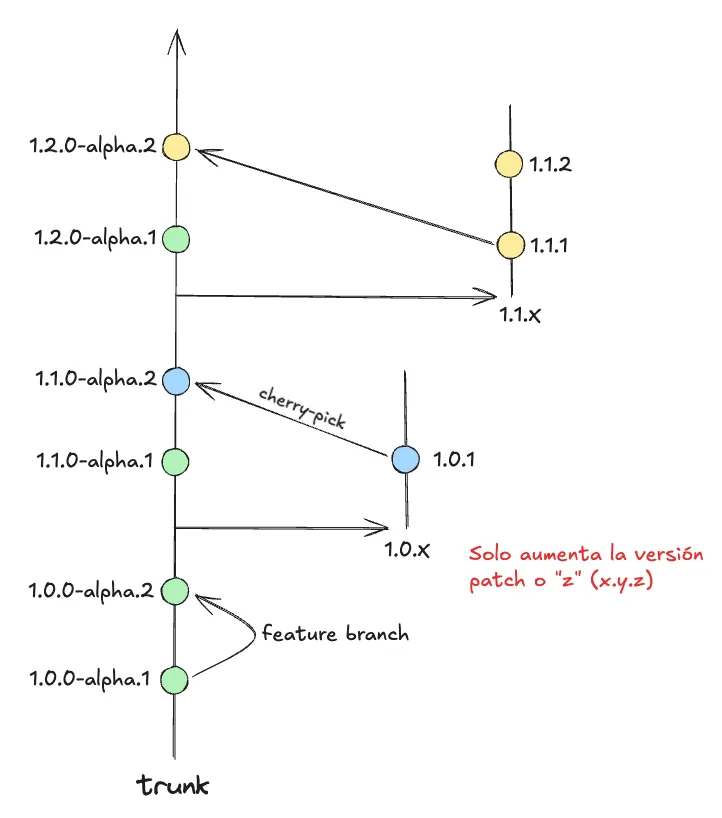
In this example, we can see that there is a main branch called Trunk, and from this branch come Feature and Release branches. The feature branches are for integrating new functionalities, whether it is the evolution of something existing or adding something completely new. Even the Trunk branch is considered an unstable branch, as it may contain breaking changes that will be deployed in a subsequent major version. But in this example, how can I avoid integrating a breaking change if that change is not yet ready for users to consume? This is very important to keep in mind for both external and internal libraries, as it can generate friction among developers, impacting Time-To-Market and the developer experience.
Feature Flags is a technique that allows activating or deactivating functionalities without needing to publish a new version of the application. In Flutter libraries, using flags in a simple and localized way is especially useful for versioning: it allows you to introduce new behaviors as opt‑in, avoid breaking changes, and offer a gradual migration path. A complex feature flags platform is not needed; it is enough to expose clear toggles in the public API, document their default values, and the retirement plan. Some ways to implement it can be:
- Use the
@Deprecateddecorator offered by Dart.
@Deprecated("This component is deprecated.")
class Button extends StatelessWidget{
  final String text;
  final VoidCallback onPressed;

  Button({required this.text, required this.onPressed});
}- Make backward-compatible changes to give users time to update their implementation.
class Button extends StatelessWidget{
  @Deprecated("Deprecated parameter, use `content`")
  final String text;
  final Widget? content;
  final VoidCallback onPressed;

  Button({required this.text, required this.onPressed, this.content});
  @override
  Widget build(BuildContext context){
    return ElevatedButton(
      child: content != null ? content : Text(text),
      onPressed: onPressed
    );
  }
}- If a component is not yet ready to go to production, it can be made private or simply not exported in the barrel files so that users cannot see and/or use it.
Automation with AI
Since we are in the rise of artificial intelligence, here are also some tips or advice that can help improve the developer experience when using intelligent agent assistance.
Copilot instructions or AGENTS.md
This can be useful when developing libraries or applications. The purpose of these files is to declare a set of rules that the agent will inject into its context window every time a prompt is sent, which is why it is very important not to go too long with these rules. In the Flutter documentation, they specify the limits that each IDE has.
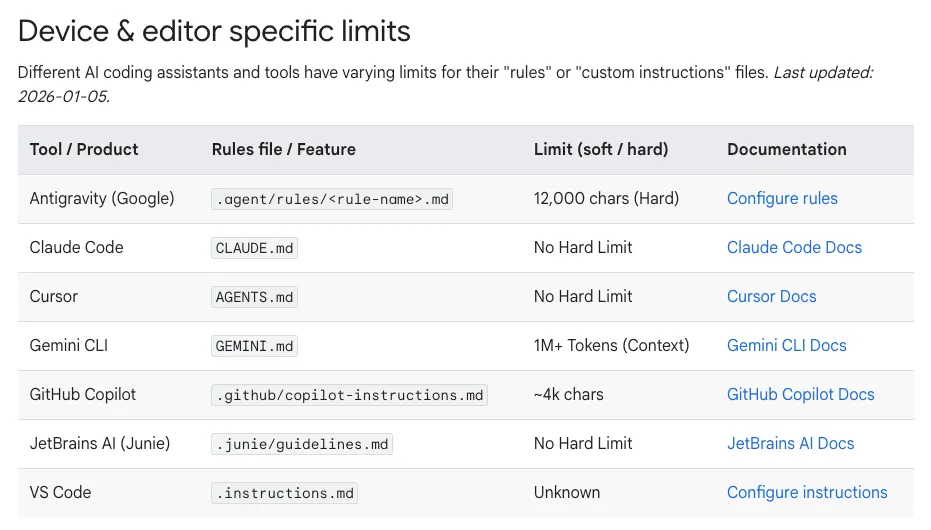
An example of what a curated instruction file of 1,000 tokens could look like is:
# Flutter AI Rules
**Role:** Expert Dev. Premium, beautiful code.
**Tools:** `dart_format`, `dart_fix`, `analyze_files`.
**Stack:**
* **Nav:** `go_router` (Type-safe).
* **State:** `ValueNotifier`. NO Riverpod/GetX.
* **Data:** `json_serializable` (snake_case).
* **UI:** Material 3, `ColorScheme.fromSeed`, Dark Mode.
**Code:**
* **SOLID**.
* **Layers:** Pres/Domain/Data.
* **Naming:** PascalTypes, camelMembers, snake_files.
* **Async:** `async/await`, try-catch.
* **Log:** `dart:developer` ONLY.
* **Null:** Sound safety. No `!`.
**Perf:**
* `const` everywhere.
* `ListView.builder`.
* `compute()` for heavy tasks.
**Testing:** `flutter test`, `integration_test`.
**A11y:** 4.5:1 contrast, Semantics.
**Design:** "Wow" factor. Glassmorphism, shadows.
**Docs:** Public API `///`. Explain "Why".
Skills
Unlike instructions, a skill is not just a function, but a set of instructions, best practices, and workflows that teach the agent how to use the tools to solve a complex problem. For example, a skill to create a component within an application:
---
name: generate-feature
description: Generates a new feature (component) within the Flutter project, creating the folder structure, page files, widgets, models, and routes following the project's existing conventions. Use when the user asks to create a new feature, module, screen, or component, or when they mention adding a new section to the app.
---
# Generate Feature in <Project>
## Project Architecture
The project uses a **feature-first** architecture with the following optional layers per feature:


lib/features/<feature_name>/
├── <feature_name>_route.dart          # go_router routes for the feature (always)
├── presentation/
│   ├── <feature_name>_page.dart       # Main page (always)
│   ├── <other>_page.dart              # Secondary pages (optional)
│   └── widgets/                       # Local widgets (optional)
│       └── <widget_name>.dart
└── domain/                            # Only if there are models
    └── models/
        └── <model_name>.dart

There is **no** `data/` layer in any feature. There are no repositories or datasources implemented.
## Conventions
### File Naming
- Files: `snake_case`
- Pages: suffix `_page.dart` → class `PascalCasePage` as `StatelessWidget` or `StatefulWidget`
- Routes: suffix `_route.dart` → variable `camelCaseRoutes` of type `List<RouteBase>`
- Widgets: descriptive name `snake_case.dart` → class `PascalCase`
- Models: singular name `snake_case.dart` → class `PascalCase`
### State
No external state management is used (no Bloc, no Riverpod, no Provider). Only `StatefulWidget` + `setState()`.
### Navigation
- `go_router` exclusively
- Navigation with `context.go()` (replace) and `context.push()` (stacked)
- Routes as plain strings: `/<feature>`, `/<feature>/<sub_page>`
### Main dependencies
- `go_router` for navigation
- `google_fonts` for typography
- No barrel files or centralized exports
## Step-by-step process
### 1. Create the folder structure
Create the feature directory and its subfolders:

lib/features/<feature_name>/
lib/features/<feature_name>/presentation/

If the feature needs local widgets:

lib/features/<feature_name>/presentation/widgets/

If the feature needs models:

lib/features/<feature_name>/domain/models/

## Final checklist
- [ ] Folders created with the correct structure
- [ ] Main page of the feature created with `StatelessWidget` or `StatefulWidget`
- [ ] Secondary pages created (if applicable)
- [ ] Local widgets created in `presentation/widgets/` (if applicable)
- [ ] Models created in `domain/models/` (if applicable)
- [ ] `_route.dart` file created with the routes of the feature
- [ ] Import added in `lib/core/config/routes.dart`
- [ ] Route spread added in the correct position (inside or outside `ShellRoute`)
Spec-Driven Development
It is a new methodology that has been gaining strength, where the "source of truth" is not the code but one or several formal specification documents. With this, the agent is expected to handle the code and the developer only needs to define the requirements, design, and tasks that the LLM must perform.
This can be applied in the development of libraries and/or applications, whether we want to add a new functionality or evolve an existing one. In the following article, I discuss more about this topic.
Conclusions
Building a library is, at its core, an exercise in empathy with the developer who will consume it, who is often yourself in six months. A predictable API, an honest changelog, tests that support each version, and security decisions made by design are what separate a useful package from one that generates more questions than answers. If this article gave you concrete starting points, the next step is to apply them in the next library you build or maintain.
If you want to see more articles from Bancolombia Tech, here is the link to the site.
Comments
Share your thoughts on this post